Showing posts with label ALM. Show all posts

Wednesday, January 03, 2007

Seamless Integration: Testing 2.0!!

End-to-end seamless integration of tools is important in every domain, especially ALM. iTKO seem to have understood the concept and is delivering a Test Automation Platform (LISA) which not only allows automation of customer scenarios (spanning across various technologies), but also provides integration APIs to integrate with rest of the ALM tools.

For example:

A test can register a user on a web-portal, download a software, installs the bits on a local or remote system, runs commands to finish & verify installation, calls a web-service to confirm product registration and in the end queries the database to make sure all tables are correctly populated - all from within the context of the same test case!

There are even APIs available to expand the core functionality of LISA - like filters, assertions, companions, etc.

There is more... Once the test is automated, it can be automatically kicked off as part of cruise control, or other Ant integration, post result into a central database or TestDirector or homegrown test management system, automatically file a bug or integrate with requirement management system. Use of pure java, xml, open architecture and public APIs makes the seamless integration possible across the entire ALM domian.
The tool allows all data strategies I discussed in my August blog. The data driven testing is the key to leverage test scripts, lower maintenance and improve ROI.

Checkout Test Automation Tools blog. It nicely captures the automation framework requirements and the battle of build vs. buy. Remember, understanding the requirements and ability to clearly articulate the question is the first step in finding the answer!

Like Paris Hilton is Marketing 2.0, LISA seems to be Testing 2.0 for Web 2.0 :-)

Tuesday, October 31, 2006

Understanding ALM

It is important to understand the complete life-cycle of an application to know and manage risk around it. ALM links all pieces of the puzzle to give us a complete picture and a bird-eye view. One can look at the life-cyle from different perspectives - For example: it can be read to reflect risk from quality standpoint.

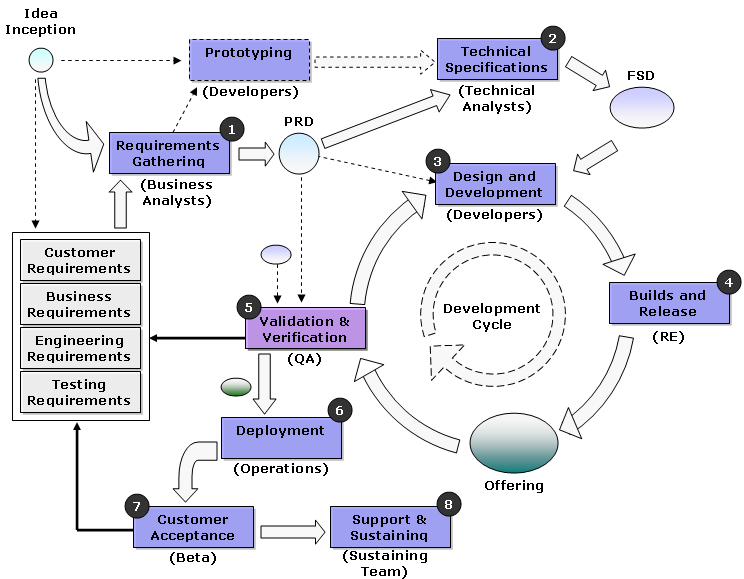
Every software project starts with a simple concept and follows eight typical steps as shown in the following ALM diagram:

CopyRight - Rajeev
In the first step, Business Analysts gather requirements from customers (voice-of-customer forms, surveys, polls) and document them in the requirements database called Product Requirements Definition (PRD). Once the requirements are ironed out, Technical Analysts convert these requirements into Functional Specifications Definition (FSD) in terms of User Cases (UML diagrams). The process then goes through the development cycle, where developers, release engineers, and testers work together to deliver the requirements in form of a product or a service offering.

In this process, Quality Assurance (QA) team is responsible for the validation (Are we building the right thing?) and verification (Are we building the thing right?) of engineering deliverables.

The above ALM diagram summarizes different steps of a typical software development process. Companies have various adaptations of this overall process with the following steps being crucial and unifying.

  • Requirements Management
  • Test Management and Test Automation
  • Release Management
There are different players in the ALM industry (top ones being Mercury and Borland) that provide tools for different pieces of the puzzle. More and more companies are focusing on automation frameworks, which aid testing. However, if you really want to improve quality of your products, you must "Cease dependence on inspection to achieve quality" (Deming's TQM principle)

Risk is injected into the system everytime some information (or some work-product) exchange hands. We must have tools that can measure the quality of the processes (i.e. ALM sub-processes) to be able to deliver a really good quality product.

Watts S. Humphrey is the poineer of TSP and PSP processes, which uses software engineering discipline to deliver higher quality products. Look at this video for more enlightenment.

Trackback URL: Understanding ALM

Saturday, September 02, 2006

Understanding SOA

SOA is the buzz word these days. Gartner reports predict that more than 80% of applications will be based on SOA by year 2009. So, what is SOA and why is it picking up so fast?

SOA means different things to different people. Different parts of organizations have different motives behind adopting SOA. It has something for everyone!

We all know SOA is "Service Oriented Architecture", but what does it really mean? And more importantly what does it mean to an engineer? What does it mean to an IT organization? What does it mean to the top management? And what does it mean to a company as a whole?

Distributed Computing

Distributed computing is not new. Over the past 2 decades, we have seen it grown from simple 2-tier client-server architecture to 3-tier and then N-tier and p-2-p architectures. The goal of a distributed system has always been scalability, availability, and flexibility. Moreover, distributed architectures have helped companies to better align their resources (both human and hardware)

SOA evolution

Distributed computing allowed companies to break their systems into smaller components. This helped companies to realize the fact that a majority of these smaller components are not related to their core business and, in fact, are common across different companies and even industries. For example, entitlement and billing systems, payment systems, catalogue management, application infrastructure layers and even middle wares.

With the bust of dot-com era, companies started thinking about ways to lower costs. One of the most obvious was to out-source the non-core aspects of the business. The outsourcing and consulting companies find this really interesting, as they started leveraging their experience across companies and industries. The need for openness and ability to consume third party services led to the advent of web-services and Service Oriented Architecture (SOA).

Software as a Service (SaaS) and SOA

Software delivery as a service has grown rapidly as more and more companies have realized that they can keep the customer relationship active by delivering software as a service, rather than delivering one-time products. I see SOA as a SaaS enabler.

What does SOA mean to an Architect?

SOA provides loosely coupled components. Each component is implemented using open standards for flexibility and future expandability. Architects need to make sure that there is no Single Point of Failure (SPOF) in the end-to-end system and, in some cases, are forced to implement extra caching mechanisms to improve availability and reliability. SOA brings simplicity back to architectures.

What does SOA mean to Development?

To developers, SOA means smaller teams and shorter development cycles. However, SOA also means more coordination across different teams and requires developers to follow standards.

What does SOA mean to an IT organization?


SOA enables faster release trains. With SOA, not all components needs to be upgraded at once. That means Bug fixes can be delivered faster, safer and easier. Less downtime and happy customer. SOA provides business agility. SOA enables continuous change!

What does SOA mean to Management?

SOA means large number of smaller projects rather than one monolithic project. Till date, it has been a nightmare for management, as they have not been able to grasp the power of SOA and the concept of smaller projects. To management, it only means more projects. Since Software development has been famous for not following discipline and processes, SOA has caused more harm than good. SOA requires engineering discipline and standardization.

A lot of organizations have been caught in the messy middle - the market environmental pressures are forcing them to enable SaaS and adopt faster release trains, Technology office and architects are pushing SOA, and the managers are stuck with their dogmatic viewpoints around waterfall methodologies. Engineers are confused, not knowing what to do, and quality is the last thing on anyone's mind.

The irony is that SOA goes hand-in-hand with agile development methodologies like Scrum. If and only if the management can be trained in SOA and newer development mythologies like Scrum, the companies can dream of coming out of this messy middle.

Changing market environment and industry pressures have forced companies to adopt SOA, but not everyone in management is even aware of the change. Management needs to be trained with new ALM tools to be successful.

What does SOA mean to a Company?

SOA enabled applications live longer and the ROI curve becomes very lucrative very fast. For companies, SOA is a blessing (if only they can deliver it right).

Final Thought:
SOA requires better ALM tools and integration of processes. The dependency among different components of SOA is not trivial. Sophisticated tools are required to orchestrate the whole application life-cycle management.

Trackback URL: Understanding SOA

Automation: Beyond Testing

Automation is the key to productivity in any functional group in any organization. But for majority of people:

  • "Automation" = "Test Automation"
The general perception is that we should spend all our resources in automating test cases to cut-down test-cycle times! Well, that's not entirely true. Test cases are a small piece of the overall puzzle. Automating test cases is important, but it alone does not gaurantee reduced cycle time and faster release trains.

We must automate not only the overall testing process (which is far more than just automating test cases), but also other processes that takes up considerable amount of resources and are prone to errors. The biggest problem with automating processes is getting buy-in from the top management and all the cross-functional teams they impact. Moreover, some people see automation as a threat to their job and hence never fully support the idea. However, the fact remains that to boost productivity, one must maximize the use of labor and capital - which can be best achieved via Automation!!

Automation has following benefits:
  • An automated process tends to live longer and ROI follow an exponencial curve.
  • Automated processes are a lot easy to follow.
  • Automation provide repeatability and consistency and boosts the quality of the process itself.
  • Good quality processes results in good quality products (TQM principle)
  • Employees get more frustrated by the process relaeted issus. A lot of product related issues are there because of broken processes.
  • Process Automation makes the upper managaemet's life easy. It generates data and trends which can significantly impact decision making.
  • Automated process reduces the ramp-up time for new comers, as processes are a lot easier to understand, once automated.
  • Process Automation is an investment in the infrastructure.
So, how imporant is it for a team to invest in automation beyond testing? The answer is "It Depends." It depends on the complexity of the team, its structure, size and the amount of decentralization. Processes becomes overhead when your teams are small and localized, like in a startup. Most startups hate processes. Whereas the processes become really important when team grows in size, members work from home and are distributed globally in different timezones. Processes also makes sense when team members are of mixed experience as a result of attrition and growth, and there is a growing need for cross-functional collaboration.

In case you are wondering which process to automate, here is a small list of ALM sub-processes, which are a good pick for automation:
  • Requirements Management
  • Version Control, Build and Release Management
  • Change Management, Request to Integrate (RTI) Process
  • Patch Management
  • Request for Change (RFC) Process
  • QA Acceptance, Sanity testing
  • Overall Testing Process (includes test management and test automation)
  • Continuous Integration
  • Deployment
  • Defect Management
  • Customer Escalation Management, Issue Tracking
  • Program Management
  • Monitoring (servers, errors, thresholds, CPU, memory, I/O, response times, availability)
  • End-to-end real-time reporting
  • Dependency Management (must for SOA applications)
Process automation doesn't mean going out of limits and defining a process and then automating it. Start by identidying iterative activites that happen very frequently and are annoying. For large and distributed teams, where it's hard to get a handle on productivity, processes are a breeze. And if there are processes, they need to be automated to bring standardization, acceptance, speed, and higher overall productivity.

Final Thought:
If there is a process, it better be automated!

Tuesday, August 29, 2006

Automation: TQM Perspective

Quality has two perspectives - Validation & Verification.

In validation, we are checking Are we building the right thing? Basically, we are checking for conformance to customer requirements and quality attributes.

In verification, we are checking Are we building the thing right? We are more concerned about the process conformance and quality activities. Verification is more on the TQM side.

Automation provides a lot of benefits like: Repeatability, Predicability, Higher productivity, Lower costs, Shorter cycle times, Faster turn arounds, Higher confidence, and Insurance against human blunders. So, in reality Automaiton is nothing but means to achieve higher quality of processes and hence higher quality of products.

All processes that are part of Application Life-Cycle Management (ALM) must be automated to assure repeatability and keep processes in-control.

Starting form the requirements to bug-filing - everything should be automated.

  • Central Requirements Management
  • Automated unit, integration and functional testing
  • Central Code Repository, Version Control
  • Automated Request to Integrate Process
  • Automated builds (Nightly, weekly)
  • Automated Deployment
  • Automated installation of TestWare
  • Automated testbed setup and configuration
  • Automated Test execution (Functional & Non-functional both)
  • Automated Reporting
  • Automated Bug-filing!!
  • CRM Solutions - Customer escalation management
  • Project Program Management
  • End-to-End Integration and Data flow
Well, that is the ideal scenario. The closer we can get, the more successfull we are with our automation initiative. It you are a TQM fan, you'd agree that we need to improve our processes and build more quality into them which inturn will improve our product quality.

Automation has following benefits, which goes hand-in-hand with TQM benefits:
  • Provides a big picture of the overall process
  • Achieve higher adoption rates (CAP)
  • Easy to agree on standards
  • Data Archiving leads to Data Mining Possibilities
  • Historical data archives helps in decision making
  • Provides Process Traceability
  • Reports can reflect exact process state
  • Treand reports can help in gaining process maturity
  • Easy to monitor overall process
  • Email alerts in case the process goes Out-of-control
  • Defies Dilbert Model
  • Brings Focus and Accountability
  • Boosts Productivity
  • Reduces Costs
  • Saves Time
  • Higer Process Quality leads to Higher Product Quality
  • Easy to articulate SUCCESS
As I said before, it may not be possible to automate 100% of any process, but the closer we get, the better it is. Automation is like investing in infrastructure. The more solid our infrastructure is, more high we can rise. "We can't build an Empire State Building on a 6-inch foundation." If we want to achive high quality in our products, then we really need to have a very strong foundation, i.e very stable and high quality processes; and one way to achieve that is via Automation.

Final Thought:
Automation does not start and finish with Test Automation.